Sales & resale
Work your pipeline
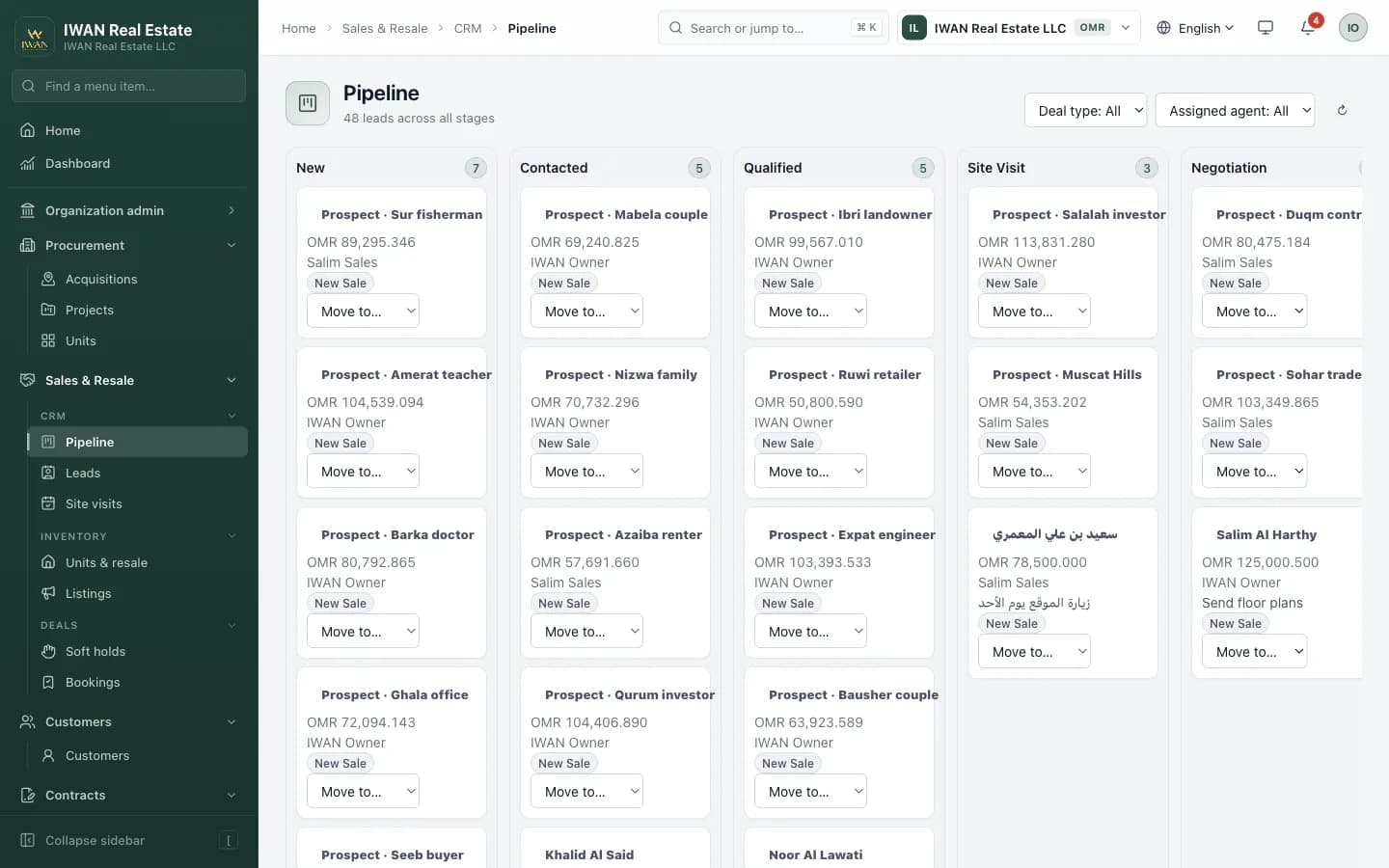
Capture leads from every source — including the FAPT portal — and move them through a Kanban pipeline: New → Contacted → Qualified → Site visit → Negotiation → Booked. Place 48-hour soft holds, convert them to bookings, manage resale ownership and publish listings to fapt.io.
Steps
- Sales → Leads → New, or let portal enquiries arrive automatically with source “FAPT Portal”.
- Assign an agent and a next step; the agent is notified in the bell.
- Drag the card across stages on the pipeline board — each move is recorded with who and when.
- At Negotiation, place a soft hold on the unit (48 h) so nobody else can book it.
- Convert to a booking: the unit becomes Sold and Finance can raise the first milestone invoice.
What’s in the module
- Pipeline board with live stage counts and full stage history
- Requirement profile per lead (budget, bedrooms, preferred project)
- Site visits with agents and outcomes; follow-up reminders
- 48-hour soft holds that expire automatically
- Bookings mark the unit Sold in the same transaction and hand over to Finance
- Listings: publish / unpublish to the portal, with photos, video, 360° tour and amenities